Write your first draft with nothing in the way. When you're done, tap Revise. Inkstand then shows you, in colour and in plain words, where your writing could be clearer.
People have been writing, crossing out and trying again for thousands of years, in every language and with whatever was to hand. Inkstand is a small tribute to all of them, and a place for you to join in.
The storytellerGriots of West Africa, who keep history alive in story and songClay and reedScribes of Mesopotamia, about 5,000 years agoPalm leaf and stylusManuscripts of South and Southeast AsiaBrush and inkPoets of China, Korea and JapanThe reed penCalligraphers of Persia and the Arab worldQuill and inkpotLetter writers and novelists of EuropeThe typewriterReporters in the newsrooms of the 1900sAnd youToday, on a phone, tablet or computer
How it works, in three steps
1Write
Type whatever's in your head. A messy first draft is fine, and Inkstand won't interrupt you. It saves as you type, so there's no Save button to remember.
2Revise
Tap Revise when you're done. Each sentence gets a colour, and small notes appear next to places that might be worth a second look.
3Share
Happy with it? Save a copy as a Word document, a web page or plain text, and send it wherever you like.
What Revise shows you
Think of it as a friend reading over your shoulder. It doesn't rewrite anything for you. It points, and you decide.
The rhythm of your sentences
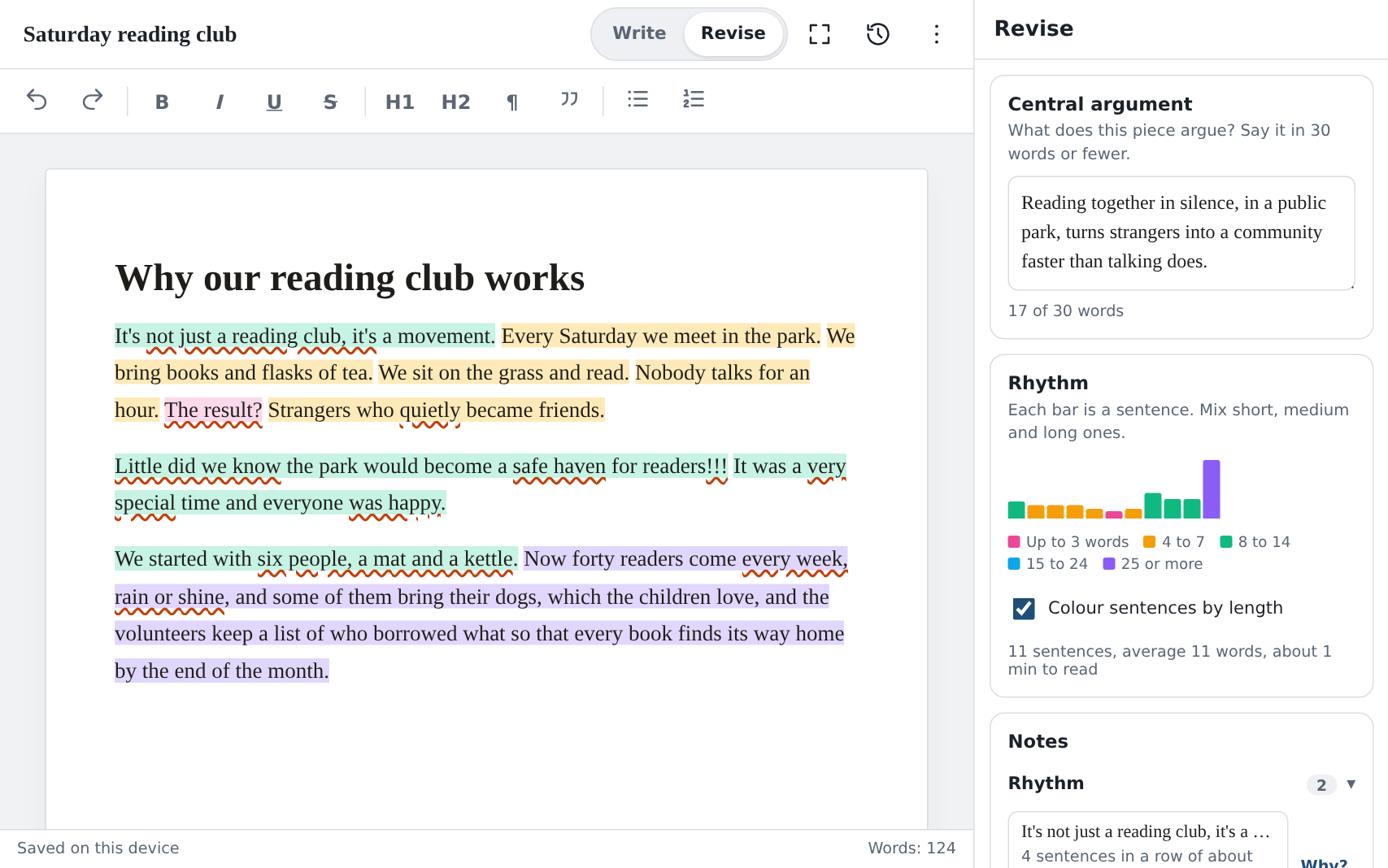
Every sentence is coloured by how many words it has:
1 to 3
4 to 7
8 to 14
15 to 24
25 or more
When a whole paragraph is one colour, every sentence is about the same length, and reading it feels like hearing one note played over and over. Mix short and long sentences and your writing starts to sound like music.
Your main point, in one line
A box at the top asks: what is this piece really saying? Try to answer in 30 words or fewer. A counter keeps track for you.
If you can't fit it in, the draft is probably trying to say too many things at once. That's useful to know, and it tells you where to start.
Gentle questions, not corrections
Notes point out tired phrases everyone has heard before, vague words like "very" and "nice", feelings you named instead of showing, punctuation slips, and the habits that make writing sound like a machine wrote it.
Each note is a question. If you meant it, keep it. Tap Why? on any note for a short explanation in plain words.
What it looks like
Here's Revise on a tablet. The draft is on the left with its colours. Your main point, the rhythm chart and the notes are on the right.
Your writing stays with you
Everything you write is kept on your own phone or computer. Nothing is sent over the internet, there's no account to make, and nobody else can read it, me included.
After your first visit, Inkstand works even with no internet at all: on a plane, in the hills, or when the signal drops.
Eight tips for better writing with Inkstand
Finish the draft first
Stay in Write until the whole piece is down, even if it's rough. There's no point polishing a sentence you might delete later.
Say your point first
Before reading any notes, fill in the main-point box. If it won't fit in 30 words, fix that before anything else.
Look for long runs of one colour
That's where the writing feels flat. Split one long sentence in two, or join two short ones.
You get the final say
The notes come from simple rules, not from an AI, and they can't know what you meant. If it's on purpose, leave it.
Stuck? Turn on Focus
On a tablet or computer, Focus fades everything except the paragraph you're writing. Press Esc to switch it off.
Older versions are kept
Inkstand keeps a copy when you leave or switch pieces. Press Ctrl+S (⌘+S on a Mac) to keep one yourself. The clock button takes you back.
Keep a copy elsewhere
Your writing lives in this browser on this device. If you clear the browser's data, it's gone. Save copies of anything important.
Put it on your home screen
Open Inkstand, then choose Add to Home screen in your browser's menu. It then opens like any other app.
Write in your own language
Inkstand speaks English, हिन्दी, বাংলা, मराठी, தமிழ், తెలుగు, ગુજરાતી, ಕನ್ನಡ, മലയാളം and ਪੰਜਾਬੀ. It opens in your phone's language when it can, and you can change it any time in Settings.
Sentence colours and punctuation notes work in all of them. Notes about word choice only understand English for now.
Questions people ask
Does it cost anything?
No. There's no account, no ads and nothing to buy.
Do I need to install anything?
No. It runs in the web browser you already have, on a phone, tablet or computer. Adding it to your home screen is optional.
Where does my writing go?
Nowhere. It's kept on your device as you type and never uploaded.
Does it use AI?
No. The notes come from simple rules that run on your device, so they work without internet and give the same answer every time.
Can I move my writing to another phone or computer?
Yes. Save a copy (a Word document works well), send it to yourself, then use Open file in Inkstand on the other device. There's no automatic syncing, because nothing is stored online.
I'm not a "writer". Is this for me?
Yes. Emails, school essays, a speech, a letter, a post, a story for your children: if you're putting words together for someone else to read, Inkstand can help.
 Inkstand